




Image 1
Image 2
Image 3
Image 4

THE HERALD

  • Patch Notes

    Live Patch Notes 1.123

    Created by

    |

    The following changes are now Live!
     

    General Changes

    • The number of quickbars has been reduced to two, but each quickbar has been expanded to 100 slots per page.
    • Houses that are not open for the public to enter and use their teleporters are now able to be trebbed down.
    • Full consignment merchants will now give the item to the 10th player who attempts to purchase it, for free
    • All Troll facial morphs have been given a substantial cosmetic surgery removing wrinkles and sun damage to give them a youthful, fresh glow.
    • New boots are now available for Lurikeens giving them the extra height they have been looking for.

    Crafting Changes

    • Knitting, crochet, quilt making, and baking have been added to the list of trades. These crafts allow players to create blankets for their mounts, sweaters for their pets, and legendary scones for their friends.

     RvR Changes

    • Benowyc, Bledmeer, and Crauchon have returned to full keeps.

      •  All other keeps, in each realm, are now ruined keeps.
    • To allow Battlegroups to form more easily, a /bg assign [player] [group leader] command has been added. This command allows BG leaders to put solo members into whichever group they want.

      • Once placed in a group, these players can not /disband from the group without permission from the BG leader.
    •  A “/stats vanish” command has been added. This tracks the number of times a player uses vanish during their time online.

    Class Changes

    Albion
       
    Cleric

    • A limited stealth ability has been added to Clerics. This allows them to stealth themselves, and one group member. While stealthed, the Cleric is unattackable. Insta cast, 1 min RUT.

     Friar 

    • Friar’s will be given mules to ride instead of horses.

    Minstrels

    • Minstrels can now charm up to four orange con pets.

    Necromancer

    • Necromancers will be returned to their original form with the pets on a 10k unit tether. The caster can safely be 3 zones over, while the pet is uninterruptible.

    Scout

    • Scouts have been given the “Hide in a nearby wall” ability.

    Hibernia

    • All Hibernian classes have been given access to Speedwarp.
    • Mogue the Trifecta Dealer has been elected King of Hibernia

    Eldritch

    • Eldritch RR5 now ports the Eldritch directly to Crair Treflan. This ability cannot be interrupted.

    Mentalist

    • The Realm Rank 5 ability, Selective Blindness, now allows the Mentalist and friendly players within 2k range to walk right past enemy players without needing to stealth.

    Ranger

    • Rangers have been given the “Climb Tree” ability.

    Vampiir

    • Vampiirs can now only be played during night time hours in-game. Vampiirs found outside during daylight hours will burst into flames and die, returning to their house, hearth bind, or guild house.

     
    Midgard
     
    Bonedancer

    • The Dread Lord is now purple con, and automatically summons on enemy healers, no targeting or commands necessary.

    Healer

    • Healing for Healers is now based off of damage dealt from melee. Healers will need to land hits in order to heal their group. The more hits a Healer lands, the more their group is healed.

    Hunter

    • Hunters have been given a new pet, the Aardvark. This pet can burrow under an enemy and reappear behind them to more easily land its rear stun style.

    Skald

    • To allow Skalds to participate more in keep siege and defense, a “Chop Wood” ability has been added to Battlesongs at level 40 specialization. This allows the Skald to better utilize their time collecting wood for siege, and repairing.

    Thane

    • Command Mjollnir now casts 3x the current amount of hammers. This is also multiplied the more Thanes there are in a 10,000 unit area.

      • Note: this is just the spell effect animation.
  • General

    Gaheris Live Server Downtime – Amazon Maintenance

    Created by

    |

    Update 12:20 PM EDT / 5:20 PM GMT: Maintenance is complete and Gaheris is once again open to players!

    The Gaheris server will be coming down Monday, April 3rd at 11:00 AM EST / 4 PM GMT for maintenance of Amazon server hosting.

    The server is expected back up before 2:30 PM EST / 7:30 PM GMT.

  • Patch Notes

    Hot Fix Client Notes

    Created by

    |

    Barring any issues, this will be the last client update until patch 1.123. Thank you all for your patience and understanding as we have made some great strides behind the scenes with these changes to set the table for more comprehensive Ui/UX and client updates down the road. Notes below!

    • Made some adjustments to the way /qbinds and movement work if the /qbind uses a modifier+movement key:

      • By default, modifier keys still don’t break player movement except in the following scenarios.
      • Movement keys are defined as forward, backward, turn left, turn right, strafe left, strafe right; autorun is not a movement key for these purposes. The following examples work the same regardless of which type of movement key is used.

        • Example 1: If a user has an ability bound to SHIFT+W and W is their move forward key, pressing SHIFT+W will only fire the /qbound ability now and will not move the character forward.
        • Example 2: If a user has an ability bound to SHIFT+X and W is their move forward key, pressing W will move the character forward and the user can still press their SHIFT+X /qbind and continue moving; so long as the user doesn’t have a bind set to SHIFT+W. If the user does have a bind set to SHIFT+W in this scenario, their character will now stop.
    • Added new option to /keyboard window “Modifiers break move keys” that when toggled will cause any manual character movement (so not including autorun) to cease when ALT, CTRL, or SHIFT are pressed. This option allows for exactly how things worked prior to yesterday’s client. By default this setting is NOT set.

      • Please note that custom UI developers will need to update their key_config.xml file in order for this new option to appear.
    • Changing from full-screen to a windowed client will no longer cause the windowed client to always appear in front of other windows or programs on the desktop. 
    • Mouse cursor movement should once again be aligned after re-sizing the client’s resolution.

  • General

    Client Hot Fix Notes

    Created by

    |

    More client updates below!

    • Users can now press the ALT, CTRL, and SHIFT modifiers when holding down their run forward keys without causing their character to stop.

      • In other words, characters will continue running forward if a user presses alt+<key>, ctrl+<key>, or shift+<key> while they are actively holding their run forward key down.

        • This change will need to have ALT and CTRL selected as a modifier in the /keyboard window to get their respective modifer+key /qbinds to function properly.
      • Please note that combinations that use the same key as the run forward key in the modifer+key may have undesired results:

        • For example: if a user’s run forward key is W it is not recommended to bind an ability to alt+W, ctrl+W, or shift+W as those /qbinds will not properly fire until the user releases their foward key and then engages the modifer key+W; after which their character will both move forward and engage the modifer key+W ability /qbind.
      • Finally, please note that the SHIFT+UP key functionality to recall your last sent messages will still work but only after activating your chat cursor via hitting the Enter key or the / key. It will no longer work when chat mode isn’t already engaged.
    • Users will no longer become mouselook locked when mouse-clicking the top or left side of a windowed client.
    • Key input functionality should be restored.

      • This should fix issues with the keyboard no longer working after using alt+tab or other Windows OS functionality for certain users and should alleviate several issues with certain 3rd party programs for all users. 

  • Patch Notes

    Live Client Hot Fix

    Created by

    |

    Update:  Using the /qbind command will no longer cause issues with the keyboard. If you are currently logged in, please log out and re-patch the client again to fix this.

    The following client changes are now live!

    • The mouse cursor will no longer become “locked” when zoning or exiting the game while mouse look is active.
    • New mouse sensitivity settings have been added to the character selection screen’s option window. These settings work as follows:

      • Users can adjust the “Mouselook Sensitivity” on a scale from 1 to 5, with 5 being the highest sensitivity.

        • The value of 3 is whatever the user’s current DPI sensitivity is on their mouse, with 2 being 25% slower than that and 1 being 50% slower and 4 being 25% faster and 5 being 50% faster.
      • The value will default to “1” on first login as this is a new option, so be sure to change this to at least 3 to get your existing mouse sensitivity settings when first logging in!
      • For users who decide to adjust their mouse’s DPI setting while in mouselook or mousepan mode after logging in, the mouse’s DPI setting will supercede this new setting still.
      • Remember, this sensitivity setting only affects mouselook or mousepan; it does not affect normal cursor movement. For normal cursor movement, please use either your operating systems mouse sensitivity settings or your mouse’s own software settings.
    • Mouselook lock mode will now only function when the cursor is located over the game’s screen. Mouselook lock mode will end when the game window is not the active window and need to be re-engaged when the game window becomes active again.
    • Several changes have been made to the /keyboard window functionality to address some outstanding issues with certain keys and mouse clicks performing multiple, unintended functions for some users. These changes affect the following:

      • Media and browser keys on some keyboards will no longer trigger some bound keys.
      • Users can no longer bind the number keys 1 through 0 or the Esc key on the /keyboard window.
      • The /keyboard window now allows the binding of a valid key after pressing an invalid key first.
      • The Esc key will now cancel the key binding action.
    • Added a borderless full-screen windowed mode option to the character selection screen’s options window!
    • The Heretic’s uninterruptable focus damage pulse has changed as follows to rebalance the spell for PvE purposes and make it more useful in RvR, with a faster ramping time but lower maximum damage.

      • Level 36 – Glistening Blaze – Starts at 85 heat damage and increases by 35%/tick up to a maximum of 75%, down from a maximum of 350%. Cast time increased to 2.5s on the initial pulse, up from 2s. Subsequent pulse tick times unchanged. Range increased from 1500 to 1600.
      • Level 42 – Whirling Blaze – Starts at 115 heat damage and increases by 45%/tick up to a maximum of 115%, down from a maximum of 400%. Cast time increased to 2.5s on the initial pulse, up from 2s. Subsequent pulse tick times unchanged. Range increased from 1500 to 1600.
      • Level 48 – Torrential Blaze – Starts at 150 heat damage and increases by 50%/tick up to a maximum of 135%, down from a maximum of 450%. Cast time increased to 2.5s on the initial pulse, up from 2s. Subsequent pulse tick times unchanged. Range increased from 1500 to 1600.

  • General

    Pendragon Client Hot Fix

    Created by

    |

    The following client changes are now live on Pendragon.

    If you have any remaining issues with mouse sensitivity, mouse movement, or keyboard functionality please hop on Pendragon and test over the weekend! Also, be sure to test out the new borderless full-screen windowed mode even if everything is fine for you on Live!

    We plan to put these client updates on the Live servers on Monday if no issues are found. If you do see any issues, please submit a feedback form describing the matter. Thank you!

    • The mouse cursor will no longer become “locked” when zoning or exiting the game while mouse look is active.
    • New mouse sensitivity settings have been added to the character selection screen’s option window. These settings work as follows:

      • Users can adjust the “Mouselook Sensitivity” on a scale from 1 to 5, with 5 being the highest sensitivity.

        • The value of 3 is whatever the user’s current DPI sensitivity is on their mouse, with 2 being 25% slower than that and 1 being 50% slower and 4 being 25% faster and 5 being 50% faster.
      • The value will default to “1” on first login as this is a new option, so be sure to change this to at least 3 to get your existing mouse sensitivity settings when first logging in!
      • For users who decide to adjust their mouse’s DPI setting while in mouselook or mousepan mode after logging in, the mouse’s DPI setting will supercede this new setting still.
      • Remember, this sensitivity setting only affects mouselook or mousepan; it does not affect normal cursor movement. For normal cursor movement, please use either your operating systems mouse sensitivity settings or your mouse’s own software settings.
    • Mouselook lock mode will now only function when the cursor is located over the game’s screen. Mouselook lock mode will end when the game window is not the active window and need to be re-engaged when the game window becomes active again.
    • Several changes have been made to the /keyboard window functionality to address some outstanding issues with certain keys and mouse clicks performing multiple, unintended functions for some users. These changes affect the following:

      • Media and browser keys on some keyboards will no longer trigger some bound keys.
      • Users can no longer bind the number keys 1 through 0 or the Esc key on the /keyboard window.
      • The /keyboard window now allows the binding of a valid key after pressing an invalid key first.
      • The Esc key will now cancel the key binding action.
    • Added a borderless full-screen windowed mode option to the character selection screen’s options window!

  • General

    Friday Grab Bag – 03/24/2017

    Created by

    |

    TGIF…and time for another Grab Bag!

    Thanks to everyone who sent in questions, keep ’em coming! You can send in your questions through our Grab Bag submission form. Please note this is for game questions, feedback should be sent in through our feedback form.

    Our newsletter also returned this week! If you aren’t subscribed to receive our newsletters, sign up now! In the meantime, you can view the newsletter in your browser here.

    Now, on to the questions!

    Is there any chance that the DF Quest NPC can be reinstated? With the RPs that are now available due to Buggane and Population Bonuses, I feel the small reward from this quest would be great for casual players like myself and also increase activity and maintained ownership of DF.

    We can look at adding in some version of this quest back to help incentivize players to venture into Darkness Falls. However, this new quest version would likely be made to only work on enemies defeated within the dungeon instead of everywhere.

    As for realm point bonuses in general we are very happy with the dynamic population and keep capture bonus systems and don’t foresee changes to those in the near future. However, the bonuses for Buggane’s Obelisk may get adjusted downward a bit or changed to no longer award RPs due to their impact on RvR behavior. While the consistent action that the obelisk provides is quite popular with many players, there is considerable negative feedback about the type of action that revolves around the objective and how it negatively impacts action in other locales throughout the frontier. No decision has been made either way at this time but we would like to take this opportunity to start a discussion about it and garner your feedback on it!

    Creating new toons is a great fun until it comes to choose a name. Many are already taken and even the suggested ones aren’t available. Can we have a clean-up of this random list, or unused names?

    This is a great point and we can absolutely look at culling the taken randomized names from the list and adding in some new ones, thanks!

    Are there any plans for the come back to Camelot campaign to return, or something to add a shot in the arm for population?

    Our last Come Back to Camelot campaign was a huge success, so we will definitely have another. However, first we’re going to focus on addressing many of the concerns we’ve received from the playerbase about classes, RvR, and items. Once those concerns are addressed appropriately, we will have a Come Back to Camelot Campaign as a way to incentivize players to come back and see the changes. Doing a campaign prior to making those changes wouldn’t be as effective.

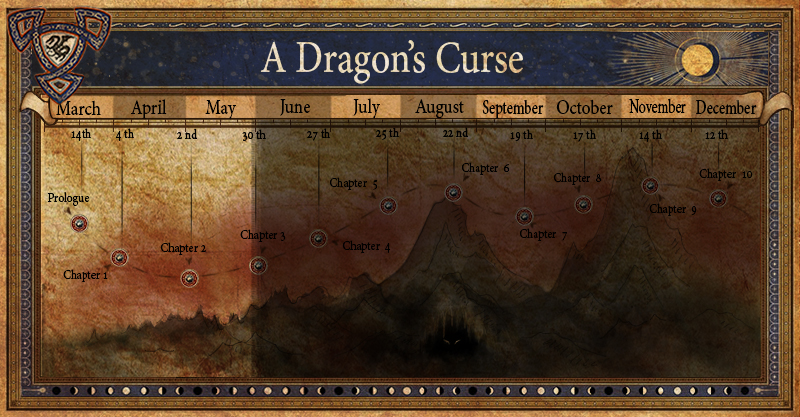
    In the meantime we have the new A Dragon’s Curse PvE campaign, seasonal events, and battleground weekends to help increase the population. On a longer term though we are considering offering an alternative ruleset server that will attract players who may not be interested in Ywain and its ruleset back to the game in conjunction with either a Come Back to Camelot campaign or other incentives for players to return to and stay on Ywain as well.

    There has always been rumors and some old data about soft and hard caps. I’ve always heard that there’s 0 benefit for having more than 250 quickness, and very minimal returns on damage after 400 strength. What are some of the soft/hard caps on stats?

    Soft and hard caps differ depending on what aspect of the stats’ benefit you are considering. For instance, swing speed is not increased beyond 250 quickness but evade uses both dexterity and quickness stats in its formula so higher than 250 quickness can still help evade rates.

    Additionally, for weapons that use dexterity as their base, going over 400 dexterity has the same diminishing returns to melee damage as going over 400 strength does for strength-based weapons. However, going over 400 dexterity could still improve your cast speed (on some casts) or evade rate. Going over 400 strength or dexterity can also improve your weapon skill and therefore defense penetration if you aren’t already at those caps either (which differ for each class and weapon).

    Acuity also has diminishing returns for spell damage over 400 but that would be extremely hard or impossible to reach currently.

    Constitution is the only stat that doesn’t have a soft cap.

    In your last Grab Bag we could read about the hidden weapon skill of the shield spec line. Now I would like to know if Left Axe, Dual Wield and Celtic Dual also have a hidden weapon skill, or if they just use the weapon skill of your mainhand weapon spec (like axe, sword, hammer, pierce, slash…).

    So will a Left Axe, Dual Wield and Celtic Dual user be fine with 51 points in his main weapon spec (including +skills), or will a higher main weapon spec also have influence on his LA, DW and CD damage output?

    There is a hidden weaponskill for Left Axe, Dual Wield, and Celtic Dual specs. However, the main weapon spec (Sword, Slash, Blades, etc.) does contribute to *most* of the damage dealt by dual-wielders.

    There should be no difference in damage when using a Left Axe, Dual Wield, or Celtic Dual style whether the main weapon spec is 50+11 or 40+11. In other words, once you reach the 51 composite on Sword, Slash, Blades etc. and are using a dual-wielding style your damage won’t be increased by adding more Sword, Slash, or Blades spec.

    However, your Left Axe, Dual Wield, and Celtic Dual specs do have their damage (and in the case of Celtic Dual and Dual Wield their offhand swing chance) increased with a higher specialization in them. A Mercenary with 25+11 Dual Wield and 51 composite Slash will hit for less than a Mercenary with 50+11 Dual Wield and 51 composite Slash when using a Dual Wield style; they will also swing with their offhand less often.

    Thanks again for the questions, and remember to keep sending them in!

  • General

    St. Patrick’s Day Event

    Created by

    |

    Are you feeling lucky?

    In celebration of St. Patrick’s Day and running from now until Monday, March 20th, our second annual ‘Leprechaun Treasure’ quest is on!  

    To get the quest, level 50s should pay the following poor souls a consoling visit:

    Edmund in Cotswold’s tavern
    Bjorne in Mularn’s beer hall
    Silvadren in Mag Mell’s pub


    • As part of the quest, players will be shapeshifted into a realm-specific “leprechaun” but have ALL of their stats debuffed by 75%.
    • But fear not, leprechauns may be weak but they are also nigh impossible to catch: shapeshifted players will also have an unbreakable CC-immunity and speed buff for the duration of the shapeshift.  
    • Oh, and we hear the real leprechauns love hiding their treasure in dangerous lands and ancient ruins. Enjoy some zany RvR through the weekend!
    • The ROG reward is a choice between a ring or a bracer similar to the Valentine’s Day event with some slight differences. These ROGs will only allow up to 5 slots for stats but will also have 1 of 6 possible /uses.


    For players of all level ranges, there are three pesky little tricksters who are hoping you’re not too lucky! A ‘charming’ reward will be bestowed upon those who have the cunning to out-wit:

    Killaghe in Albion
    Daighu in Midgard
    Iollarme in Hibernia

    The “Luck of a Leprechaun” quest can be obtained from the following:

    Sir Prescott in Cotswold
    Hrolf in Mularn
    Epona in Mag Mell

    Once again, the event will run until Monday, March 20th.

    A happy and safe St. Patrick’s Day to one and all, and we’ll see you in the Frontiers!

  • Patch Notes

    Client Hot Fix

    Created by

    |

    If you are currently experiencing any mouse, auto-run, or client-related issues after 1.122C we encourage you to run your patcher to get the newly updated client! Fixes are listed below:

    • Users that have their forward key set to break auto-run in the /keyboard window will once again be able to engage the auto-run key while holding their forward key down.

      • For users who do not see the option to change whether their forward key breaks auto-run in their /keyboard window, they can switch to the default UI to see it or download an update for their custom UI.
    • Users with Mouselook OFF set on the character selection screen’s game options will once again only be able to use their mouse to look left and right (and not up and down).

      • Users with Mouselook ON or Mouselook REVERSE set will be able to use their mouse to look up/down and left/right as normal.
    • Clients that use a higher full-screen resolution in-game than the resolution set in their operating system will once again be able to use their mouse across the entire game screen.
    • Mouse sensitivity should be normalized between mouse-pan and mouse-turn.

      • If, after patching, you are still experiencing issues with a very slow or very fast mouse-pan or mouse-turn, please let us know via the feedback form!

  • Patch Notes

    Live Server Downtime – Patch 1.122C

    Created by

    |

    Update 12:20 EST/4:20 GMT: Ywain and Gaheris are up and open to all players!

    All servers will be coming down Tuesday, March 14th at 5:45AM EDT / 9:45AM GMT for patch 1.122C!

    Please note that the mid-atlantic and northeastern United States will be impacted by blizzard conditions tonight and tomorrow, with high winds. We do not expect any issues but if any power outages do occur on Tuesday that inhibit this update, we will instead deploy on Wednesday, March 15th. To all of our players living in the area, stay safe and warm!

    Check out the patch notes below!